Smarter DXF Export: Don’t Overwrite Files When Nothing Has Changed
What's New?
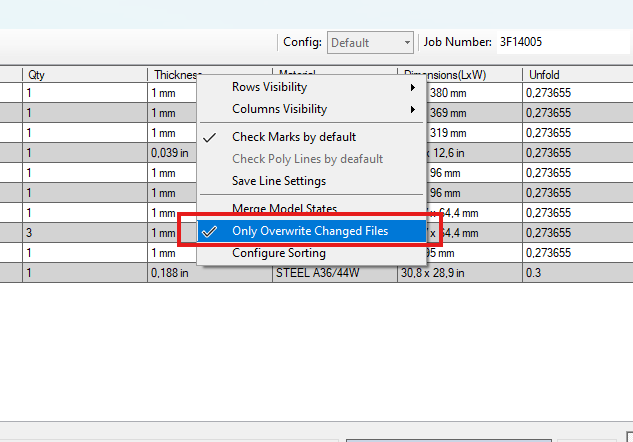
When exporting DXF files, the Publish Tool now checks whether the underlying model has actually changed. If no changes have been made, an existing DXF file will no longer be overwritten automatically.
It may sound like a small improvement, but in practice it can provide significant benefits.
Why Is This Useful?
In many organizations, DXF files are more than just exported outputs; they are an integral part of the manufacturing process. It’s not uncommon for DXF files to be modified manually after export, for example to:
Apply machine-specific laser cutting settings
Optimize files for nesting software
Add manufacturing-related information
Make corrections that are not maintained in the CAD model
In the past, there was always a risk that these manual changes would be lost when the same drawing was published again. With this new functionality, that won’t happen as long as the Inventor model itself remains unchanged.
An Example
A DXF is exported from Inventor.
A user manually modifies the DXF.
The Publish Tool is run again.
Since the Inventor model has not changed, the existing DXF is preserved.
As a result, valuable manual adjustments are not lost.
Continuous Improvements in Vault Integration
This enhancement is part of a broader effort to improve the Vault integration within the Publish Tool.
For example, the tool can now automatically locate associated drawings in Vault when they are not available locally. This functionality also works when the drawing numbering system differs from the model numbering system. The Publish Tool can still identify and retrieve the correct drawing automatically.
This makes the publishing process more reliable and reduces the need for manual intervention.
A Possible Next Step: Publishing Export Files to Vault
This new DXF functionality also raises an interesting question.
If we can reliably determine whether a file has changed, it becomes increasingly attractive to manage export files such as DXFs directly in Vault.
For organizations using Vault Basic, this could offer a practical way to gain better control over exported files without relying on advanced lifecycle management.
For Vault Professional users who find lifecycle workflows complex or difficult to align with their day-to-day processes, this may provide an interesting alternative as well. The Publish Tool could ensure that only modified files are republished and stored.
This could lead to a simpler process for managing export files while avoiding unnecessary new versions and reducing the risk of manually adjusted files being overwritten.



 EN
EN  NL
NL  DE
DE  FR
FR  ES
ES